How Insurance Agents Can Leverage Google Business Profiles for Success

You wake up one morning and find that your bathroom floor is covered in water. You look under your sink and you find the source of the problem: a slow, steady drip from a pipe.
Unless you have a plumber on call, you’ll probably open your phone or computer and search for “plumbers near me” or something similar. Instantly, Google delivers a few results that match your query.
You’ll usually see a few right at the top of the search results that show nearby plumbers on a map with corresponding profiles containing links to their websites, phone number, pictures, a logo, and the name of the business.
These listings are called Google Business Profiles, and they are an extremely effective tool for small businesses of all kinds – including insurance agents. These results have high visibility and are especially effective at capturing leads, generating phone calls, and driving visits to a business’ website. Recent data has shown that 69% of insurance consumers search online before scheduling an appointment with an agent. If you aren’t appearing within those first few search results, then you’re missing out on a lot of potential leads.
Let’s take a look at some of the benefits of setting up a Google Business Profile for insurance agents and some step-by-step directions to guide you through the process of setting up your own profile. Then, we’ll dive into the anatomy of a GBP and share tips for optimizing your own listing.
Why do insurance agents need a Google Business Profile?
As we explored in the example at the top of the article, the average person typically turns to Google when they are in need of a professional service. These users are actively searching for these services, making them incredibly qualified leads, which is why it’s so important for insurance agents to show up closer to the top of the search results when their potential customers are searching for “Medicare agents near me” or similar terms.
We’ve written a bit about SEO strategies for insurance agents in order to help these professionals increase their online visibility, but these strategies typically take a significant amount of time before agents will begin to see results. Unlike these long-term SEO tactics, creating a Google Business Profile can provide near-instantaneous results, giving you access to a high volume of qualified leads.
When optimized, a Google Business Profile contains most of the information users will need in order to know if your business is a good fit for their needs, as well as contact information so that they can reach out to you without needing to visit your website.
How insurance agents can set up a Google Business Profile
Google makes it incredibly easy to set up your free Google Business Profile. Here are some step-by-step directions from Google that should guide you through the process of setting up your Google Business Profile.
One of the most difficult parts of the process is verifying your business. Google has used a number of methods over the years to verify insurance Google Business Profiles, including postcards sent to business locations and phone calls made to a business phone number.
Currently, Google has shown a preference for a video verification process for businesses with a physical location, which can come in two forms.
Video Recording
The first form of video verification is a video recording, which is most often used for an organization with a physical storefront where the business interacts with customers. A bit of planning is required to create these types of videos, as you need to display certain requisite information to Google in order for them to verify your profile.
- These videos must be at least 30 seconds long (without any breaks and edits), and must show the exterior of your physical business location. This is mostly done to prove that a business is appropriately placed on Google Maps, which is integrated into every Google Business Profile.
- Next, the video must also show the interior of the location and some official signage for the business.
- Finally, the video has to contain some content showing things that only an employee or manager can access; opening a cash register, an interior office, storage room, etc.
Once you have the video file, you can upload it directly to Google through your Business Profile on your phone or computer. If you’ve met all the criteria, then you should receive your verification within a few days after submitting the video.
Live Video Call
If you are a business with a physical location, you may also elect to verify your business with a live video that is submitted directly to Google support. A support representative will join the call to walk you through the process in case you need help. This live video has the same requirements as the video recording option. The primary difference here is that your live video must be submitted during the operating hours of your business, as outlined in your Google Business Profile.
Verifying a Business Without a Location
If your insurance business does not have a physical office, then you likely won’t need to bother with video verification at all. This is most likely the case if you work out of your home or remotely in general, serving customers within a service area. In this case, ensure that your Google Business Profile does not contain an address for your business, as this signals to Google that you have a location that potential customers can visit.
The anatomy of a Google Business Profile for insurance agents
If you’ve been in the insurance industry for long enough, you might already have a Google Business Profile set up. In this case, it’s vital that you take some time to optimize your profile to ensure that you’re taking full advantage of all the features that it has to offer.
Utilizing all the features on your profile not only makes it more enticing to your clients, but also increases the search engine optimization (SEO) value of your profile, making it more likely to appear above your competitors in the search results when users are looking for insurance guidance.
Let’s take a look at the anatomy of a typical Google Business Profile to understand all of the free features it has to offer:
1. Logo & Photos
Right at the top of your profile, Google displays your business logo along with any other relevant photos, such as internal and external pictures of your location. Having a logo is extremely important for branding purposes, so it’s highly recommended that you have a logo designed for your insurance business if you don’t have one already. You can upload these files yourself, but be aware that users can also upload images of your business once your profile is live.
2. Customer Reviews
As an agent, you already know the importance of word-of-mouth when it comes to lead generation. Google Reviews are an incredibly crucial form of word-of-mouth advertising because they are permanent and visible within the search results. Within an instant, a potential customer can judge your insurance business based on your star-rating in Google, and a Business Profile makes it easy for customers to leave reviews. You can also solicit reviews by sending customers a link to your profile via text or email that will direct them to the review section automatically. If you still need more convincing about the power of Google Reviews, they also have a tangible impact on your SEO visibility, making them truly vital if you want to achieve a larger digital footprint. Note that a few full customer reviews will also be displayed at the bottom of your profile, in addition to the star-rating at the top.
3. Contact Information
Right beneath the photos and star-rating in your profile, you can display the contact information for your business. This can include: a phone number, a link to your website, your business address (if you have a physical location), and the operating hours of your business. If you don’t already have a website, and you’re an agent partner of Pinnacle Financial Services, contact our creative team to collaborate on a website design for your insurance business.

4. Service Area
If your insurance business operates without a physical location, you can choose to operate as a service-area business. This allows you to identify a radius within which your business operates. You can have up to 20 service areas, and the boundaries of your area shouldn’t be more than a 2 hour drive from where your business is based.
5. Updates, Offers & Event Promotion
After your contact information, your Google Business Profile gives you the opportunity to post updates about your business, special offers that you may be providing to customers, and events that you are taking part in. This is an excellent place to promote seminars, making them visible to potential customers who may not be aware of your business.
6. Product Highlights
Next, you’ll find a segment of your profile that allows you to list the insurance products you offer. If you have web pages on your site dedicated to each of these products, you can also link each of these products to these pages. This is a great way to promote your offerings and drive relevant traffic to your website.
7. Services Categories
As part of the process of setting up your account, you’ll be asked to identify the categories under which your insurance business falls. Google will ask you to choose a Primary Category for your business, but you can also choose several Additional Categories. Most likely, you’ll want to choose Insurance Agent as your Primary Category.
8. Online Booking Tools
If you have the ability to allow clients to book appointments online, Google provides a button that you can link to your online booking tool. Again, this is a valuable asset that can help generate leads without the need to push potential customers to your website.
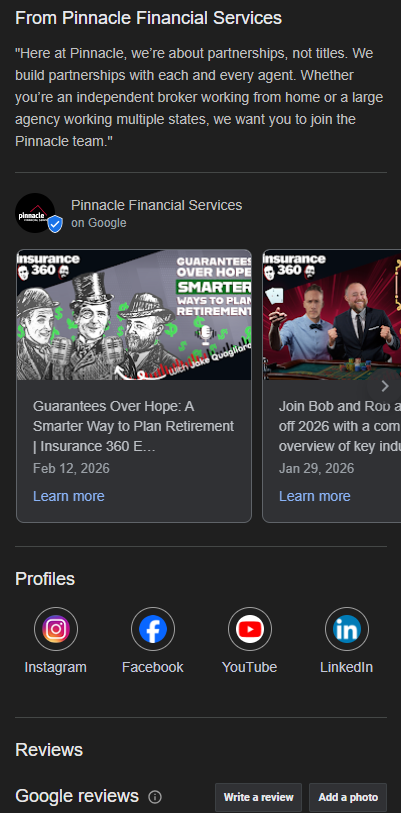
9. Social Media Links
You’ll have the opportunity to link to your social media profiles directly from Google Business. This can increase your social following and allow agents to stay in front of their potential customers in the long-term. For insurance agents, it’s recommended that you at least add your LinkedIn profile to this section.
10. Company Biography
The final section of your profile gives you the opportunity to write a description of your insurance business. It is recommended to fill this section out, even if you don’t use the entire 750 word count maximum. Google also offers a built-in AI tool that can help write this description automatically in an instant.
11. Analytics Reporting
If you’re ever curious about the efficacy of your Google Business Profile, you can review analytics data about your profile at any time. This reporting can show you some essential information that can provide insights into your online visibility, such as total clicks to your website, phone calls, clicks for directions, number of overall profile views, and the search results that users entered into Google that caused your profile to appear.
Need more guidance? Partner with Pinnacle
Pinnacle Financial Services is a leading insurance brokerage that has been partnering with insurance agents for decades, helping them grow their audiences and expand their offerings to new clients. If you’re an agent seeking support, contact us today to learn how Pinnacle can help.

Rob Valincius
MARKETING OPERATIONS SUPERVISOR
x7701 | rvalincius@pfsinsurance.com